Spotify playlist downloader - Download any Spotify Playlists to MP3
Spotify is a popular music streaming service which offers free and premium plans. Premium subscribers can download Spotify tracks, albums and playlists to the mobile, tablet and desktop app so you can listen to them without an internet connection. You can download up to 10,000 songs on each of up to 5 different devices. While this benefit is not available to free users.
However, Spotify doesn’t allow users to download playlists as MP3 files for offline use outside the app. If you want to save an entire Spotify playlist and listen without restrictions, a dedicated Spotify playlist downloader is the best solution.
In this guide, we’ll introduce the best Spotify playlist downloaders that help you download playlists in 320kbps MP3 or high-quality FLAC format, so you can enjoy your favorite music anytime, anywhere.
Contents
1. Can You Download Spotify Playlists Directly?
Yes, you can download Spotify playlists directly using the Spotify app—but only with a Spotify Premium subscription. This allows you to save playlists for offline listening within the desktop and mobile app.
However, the downloaded playlists are encrypted and can only be played inside Spotify. You cannot access them as MP3 or other audio files, nor can you transfer them to other devices or media players.
In addition, downloaded playlists are tied to your subscription. If your Premium plan expires, you will lose access to all downloaded playlists.
For users who want to download Spotify playlists as MP3 files or keep them permanently, using a dedicated Spotify playlist downloader is the only solution.
2. What Is a Spotify Playlist Downloader?
A Spotify playlist downloader is a tool that allows users to download entire Spotify playlists and save them as local audio files such as MP3, FLAC, or WAV. Unlike Spotify's built-in download function, these tools allow you to permanently save your music and play it without restrictions on any device.
Most Spotify playlist downloaders work by converting streaming songs into downloadable files while retaining important details such as song titles, artist names, and album information. Many downloaders also support batch downloads, allowing you to download hundreds of songs from a playlist at once.
For users who want unlimited offline access to music, reliable Spotify playlist downloaders offer a more flexible solution than the official Spotify app.
3. Best Way to Download Spotify Playlists
If you want to download Spotify playlists and transfer your playlists to other devices, you shouldn’t miss the best
Spotify playlist downloader
-
Boilsoft Spotify Playlist Downloader
.
Boilsoft Spotify Playlist Downloader is a powerful Spotify playlist downloader, which can easily download any Spotify playlist and save your songs as MP3,M4A,FLAC and WAV. With Boilsoft Spotify Playlist Downloader, you do not need to download Spotify songs one by one. Just add your Spotify playlist links to it, then it will download as many Spotify playlists as you like at the same time. After downloading Spotify playlists, you will find that all songs remain 100% original quality with all ID3 tags. Then you can listen to songs offline or transfer your playlists to any devices as you like. The following tutorial will show you how to download Spotify playlists step by step with Boilsoft Spotify Downloader.
4. How to Download Spotify Playlist to MP3
Follow this tutorial to learn how to download Spotify playlists with Boilsoft Spotify Playlist Downloader. This guide focuses on downloading Spotify playlists, not individual tracks.
Step 1 Run Boilsoft Spotify Music Converter
Download, install and run Boilsoft Spotify Music Converter on your Mac or Windows.


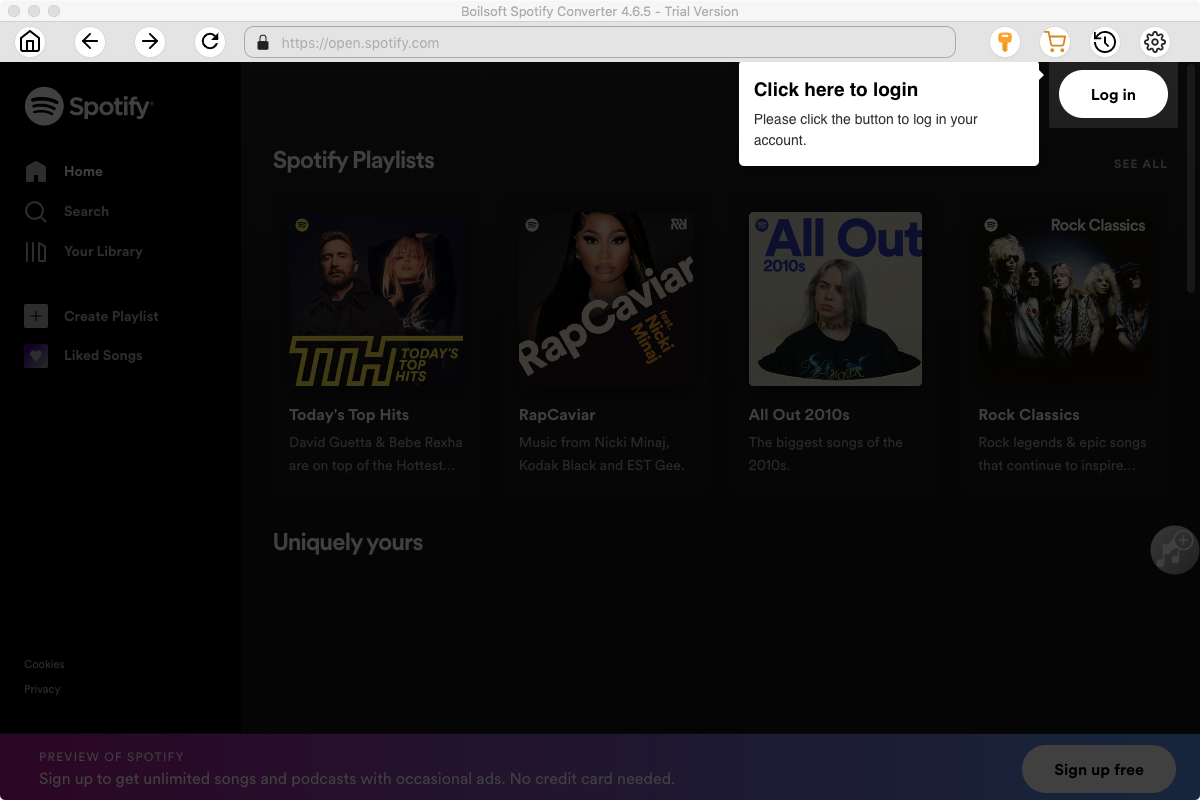
We will take Mac version as example. The interface is shown as below. Log in your Spotify account, whether free or premium.
Step 2 Select Spotify songs, albums and playlists
Select Spotify playlists you want to download from the built-in Spotify web player directly.
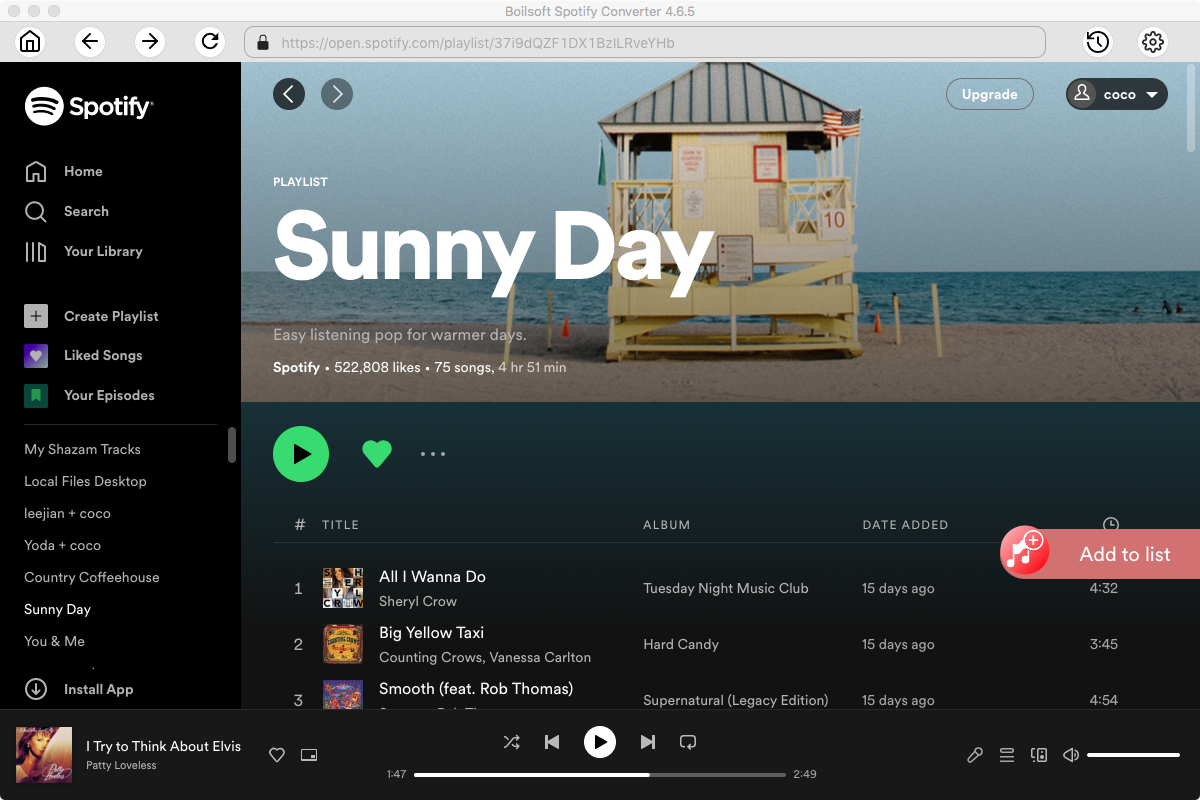
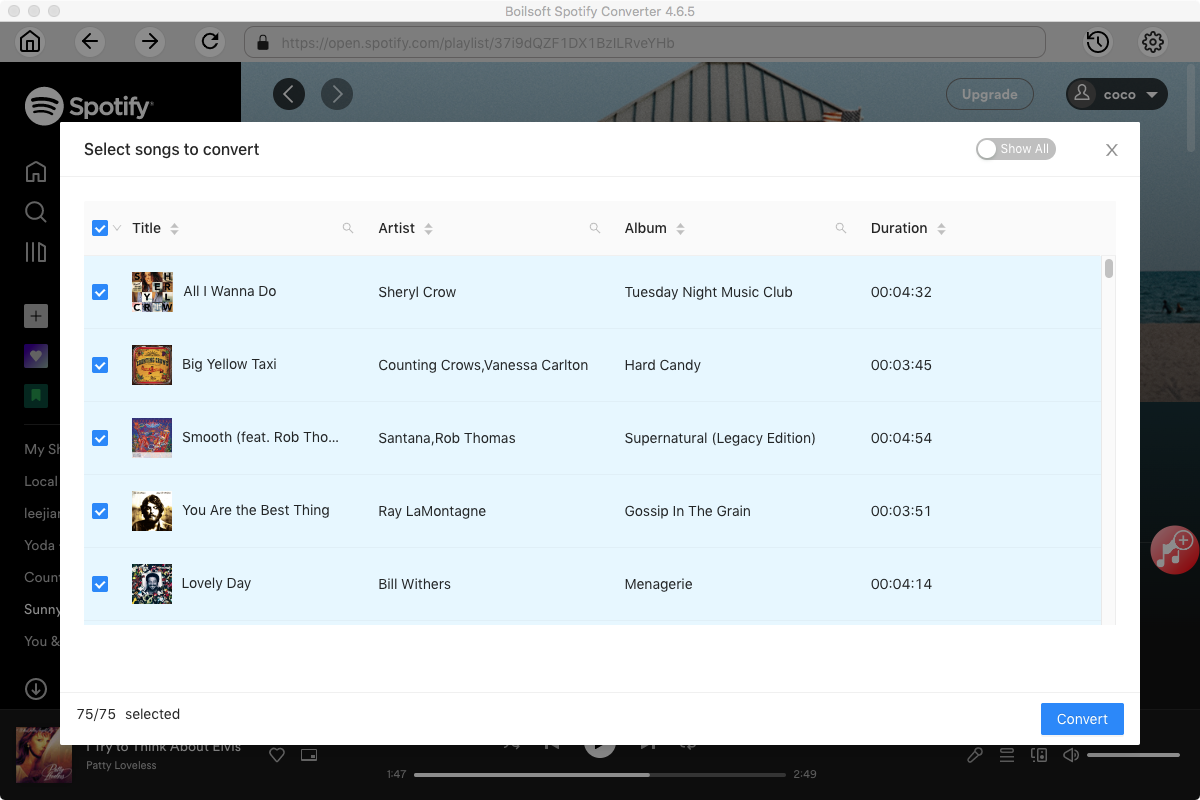
Click Add and you will see all checked songs on the interface. All songs in the playlist will be checked by default, you can uncheck the ones you don't want to download.
Step 3 Download Spotify playlist
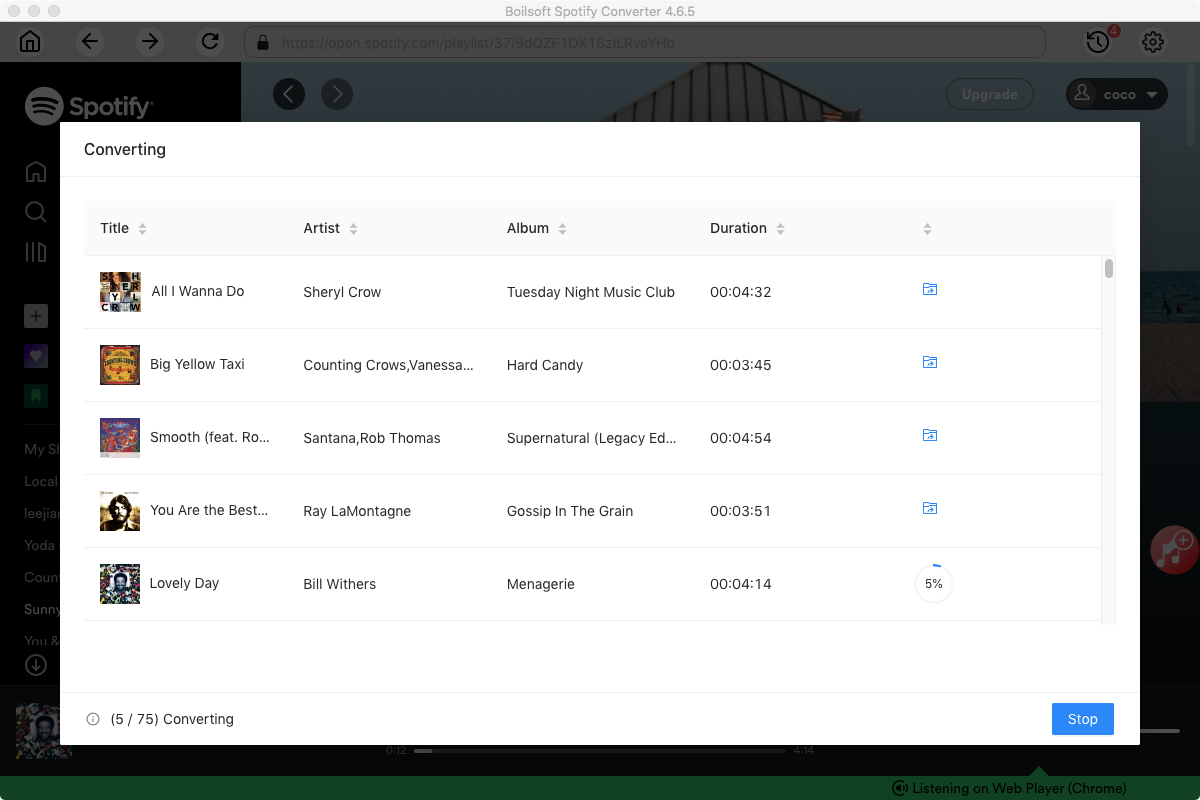
Click the Convert button to start downloading Spotify playlist. When the conversion is finished, you can click the History button to find all converted songs.
Note:
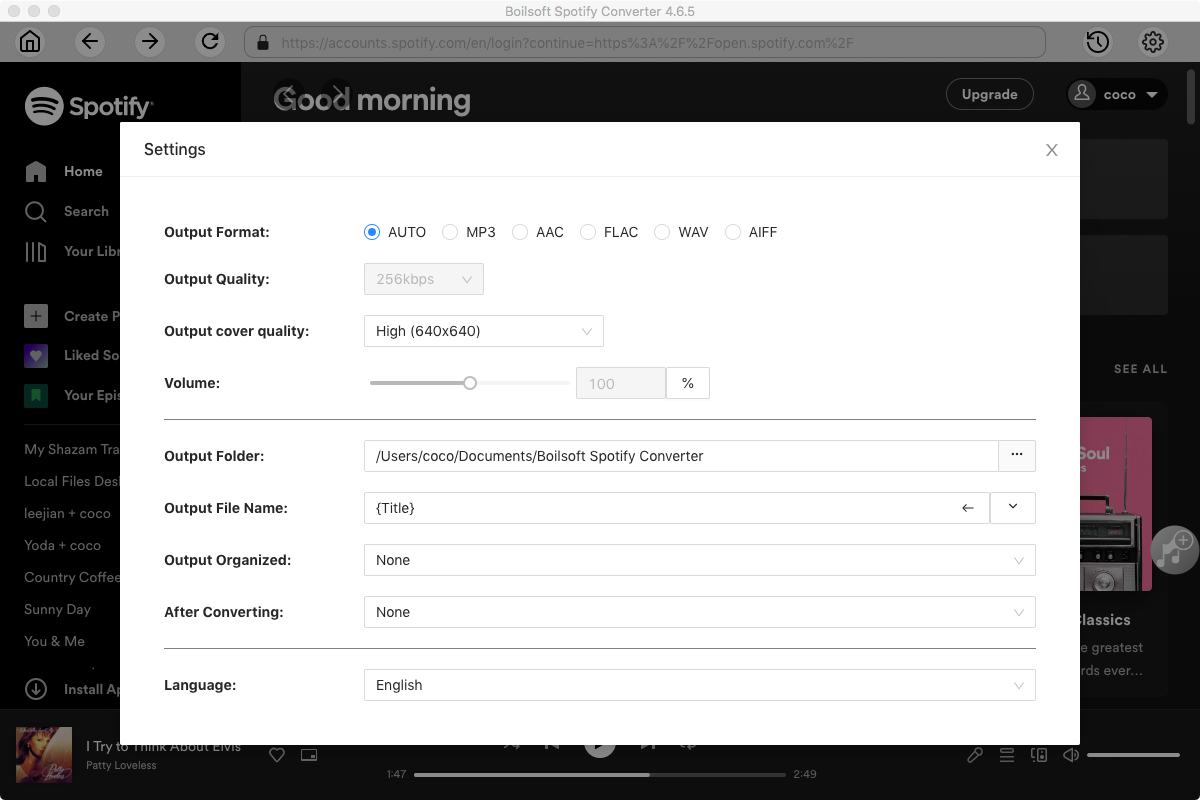
The default format is MP3. If you want to change output format(M4A, WAV or FLAC), click Option button. You can also set music quality by changing bitrate and samplerate.
Benefits of Downloading Playlists
Downloading Spotify playlists gives you more control over your music and removes the limitations of streaming. Here are some key benefits:
1. True Offline Access
Play your music anytime without needing an internet connection or Spotify app.
2. Permanent Music Files
Downloaded playlists are saved locally, so you won’t lose access even if your subscription expires.
3. Flexible Playback on Any Device
Transfer your music to MP3 players, USB drives, car systems, or any device you prefer.
4. High-Quality Audio Options
Many tools support formats like MP3, FLAC, or WAV, allowing you to choose between smaller file sizes or lossless quality.
5. Batch Download for Large Playlists
Easily download hundreds of songs at once without saving them one by one.
FAQs
Can I download Spotify playlists for free?
Yes, some free Spotify downloader tools allow you to download Spotify playlists for free. However, free Spotify downloader may come with limitations such as slower speed, lower quality, or ads.
Is it legal to download Spotify playlists?
Downloading music for personal use is generally acceptable, but distributing or sharing copyrighted content without permission may violate copyright laws.
Can I download Spotify playlists without Premium?
Yes, third-party tools allow you to download playlists without a Spotify Premium subscription. These tools can convert Spotify tracks into standard audio formats like MP3.
What is the best format for downloading playlists?
MP3 is the most widely compatible format, while FLAC offers higher audio quality. The best choice depends on your needs for quality and storage.
Can I download an entire playlist at once?
Yes, many Spotify playlist downloaders support batch downloading, allowing you to download full playlists with just a few clicks.
Check the best Spotify Downloader tools.
Read More:
- Spotify VS. Apple Music
- Best Spotify to MP3 Converter
- Download Spotify playlists with Spotify Free
- Spotify playlist Converter
- Remove DRM from Spotify music
- Move Spotify playlists to Google Play Music
- Listen to Spotify music on MP3 player
- Use Spotify Free abroad for more than 14 Days
- Sync Spotify music to your iPod
- Listen to Spotify on airplane mode without premium
- Simple ways to listen to Spotify offline for free
- How to download music from Spotify
- Export Spotify playlists to iTunes
- How to download Spotify songs without Premium
- How to download Spotify playlists to MP3
- How to download Spotify Music with Spotify Free
- How can I download music from Spotify to MP3
- How to convert Spotify to MP3
- Import Spotify songs to another music player
- Listen to Spotify in a car from a USB Flash Drive
- Enjoy Spotify music on iPod
- Enjoy Spotify music on MP3 player
- Transfer Spotify music to Google Play Music
- 5 Free Spotify downloader
- Play Spotify music with other music players
- How to play Spotify on Sonos
- How to extract MP3 files from Spotify
Tutorials
Topics


Copyright © 2023 Boilsoft Systems International Inc. All rights reserved.