WAV Splitter - WAV Cutter
WAV Cutter -- Cut WAV -- WAV Splitter -- Split WAV(Split WAV, Cut WAV without re-encode)
Boilsoft Video Splitter is very powerful WAV Splitter and WAV Cutter, split WAV, cut WAV without re-encode, So It is very fast and without any quality loss.
Boilsoft Video Splitter > Formats > WAV Splitter
What is WAV?
The format for storing sound in files developed jointly by Microsoft and
IBM. Support for WAV files was built into Windows 95 making it the de
facto standard for sound on PCs. WAV sound files end with a.wav
extension and can be played by nearly all Windows applications that
support sound.
Launch Boilsoft Video Splitter
Once installed Boilsoft WAV Splitter/Cutter, Launch Boilsoft Video Splitter.
Open File
Click 'Open' button, Select 'WAV - Audio for Windows(*.wav)' in its "Files of type" combo box.
Add your WAV file, Boilsoft Video Splitter will preview your WAV file directly.
Select Start time, and End time.
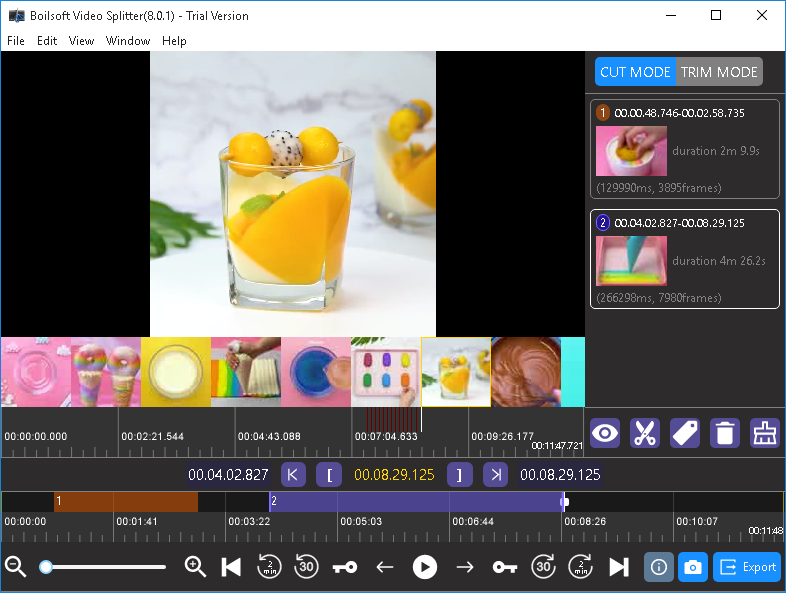
Click 'Split' button to start split your WAV file.
Read More:
Tutorials
Topics


Copyright © 2023 Boilsoft Systems International Inc. All rights reserved.