MPEG4 Splitter - MPEG4 Cutter
MPEG4 Cutter -- Cut MPEG4 -- MPEG4 Splitter -- Split MPEG4 (Split MPEG4, Cut MPEG4 without re-encode)
Boilsoft Video Splitter is very powerful MPEG4 Splitter and MPEG4 Cutter, split MPEG4, cut MPEG4 without re-encode, So It is very fast and without any quality loss.
Boilsoft Video Splitter > Formats > MPEG4 Splitter
What is MPEG4?
MPEG4 is a multimedia container format defined by the Moving Picture Experts Group (MPEG) for AV data for web (streaming media) and cd distribution, voice (telephone, videophone) and broadcast television applications.
Launch Boilsoft Video Splitter
Once installed Boilsoft MPEG4 Splitter/Cutter, Launch Boilsoft Video Splitter.
Open File
Click 'Open' button, Select ''MP4-MPEG-4 Video (*.m4v, *.mp4)"in its "Files of type" combo box.
Add your MPEG4 file, Boilsoft Video Splitter will preview your MPEG4 file directly.
Select Start time, and End time.
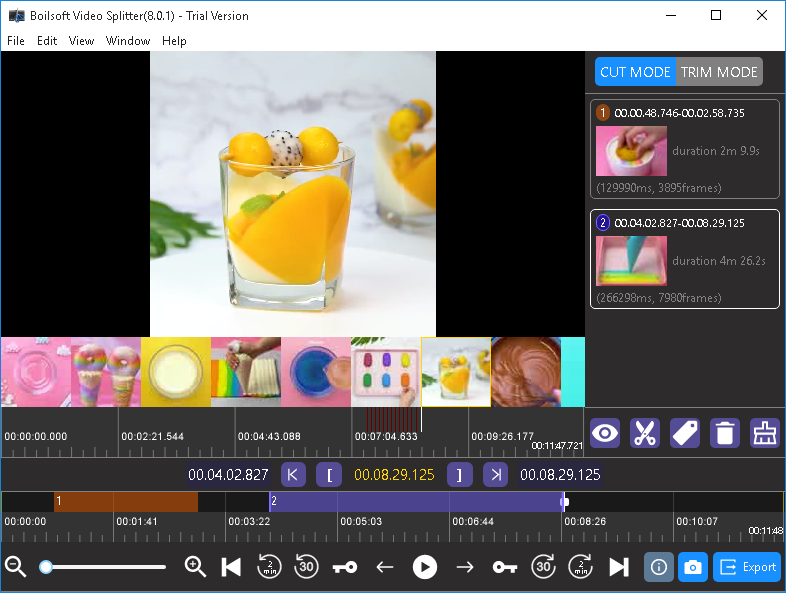
Click 'Split' button to start split your MPEG4 file.
Tutorials
Topics


Copyright © 2023 Boilsoft Systems International Inc. All rights reserved.