Boilsoft RingTone Converter Tutorial
Step by Step Tutorial
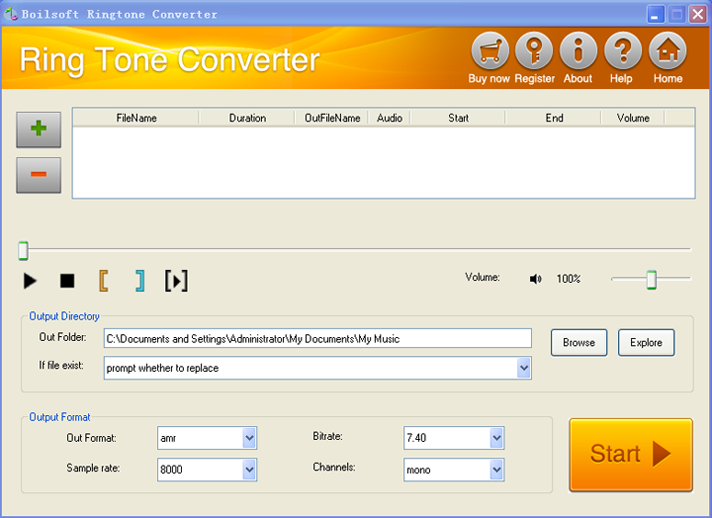
Step 1 Add video or audio formats
Press Add to add the files you want to convert, which can also be removed by clicking Remove
Supported formats includes 3GP, AAC, AC3, AIF, ALAC, AOB, APE, ARM, AU, CD Audio, DIRAC, EVO,WV,IVF, M4A, MOV, MP3, MPA, NUV, MPC , TTA, TS, WAV, PVA, RA, Real Media, SD2, SHN, MKV, DivX, DVR, FLAC, FLIC, FLV, GIF, MKA, MP4, MPEG, OFR, OGG, OGM, SND, TIVO, Video CD, VOB, VRO , Windows Media, WMA, WMV.
Step 2 Edit the file (Optional)
Press
 to play the video or audio files and the timer will start to work. Press
 to stop.
This feature is designed for you to measure your favorite segment.
When you want to designate the segment, you can press
 to set starting time and
 ending time.
Press
 to listen to the selected segment.
Step 3 Customize the ringtone (Optional)
- As can be seen from the diagram, the panel allows you to set the expected volume and output format of the ringtone, and to customize the sample rate, Bit rate and channels the ringtone will contain.
-
Press
to listen to the ringtone.
Step 4 Get your cool ringtone
When all settings are completed, just press Start Button to gain your favorite ringtone from your output directory soon.
Tutorials
Topics


Copyright © 2023 Boilsoft Systems International Inc. All rights reserved.