Boilsoft 3GP Converter -- Convert any video to 3GP
Convert avi, divx, mpeg, rm, mov, mp4 to 3gp files with boilsoft 3gp converter.
With Boilsoft 3GP/iPod/PSP/MP4 Converter, you can easily convert other video files to 3GP files(.3gp), It supports almost video file like AVI, DivX, MPEG, ASF, WMV, RM, RMVB, MOV and etc.
- Convert AVI to 3GP, DivX to 3GP, Xvid to 3GP
- Convert MPEG to 3GP, include MPEG-1, MPEG-2, VCD, SVCD, VOB
- Convert RealMedia(.rm, .rmvb) files to 3GP
- Convert QuickTime(.mov) to 3GP
- Convert 3GP, MP4 to 3GP
What is 3GP?
3GP - is the new mobile phone video file format.
3GPP, 3GPP2 are the new worldwide standard for the creation, delivery
and playback of multimedia over 3rd generation, high-speed wireless
networks. Defined by the 3rd Generation Partnership Project and 3rd
Generation Partnership Project 2 respectively, these standards seek to
provide uniform delivery of rich multimedia over newly evolved,
broadband mobile networks (3rd generation networks) to the latest
multimedia-enabled wireless devices. Tailored to the unique requirements
of mobile devices, 3GPP and 3GPP2 take advantage of MPEG-4, the standard
for delivery of video and audio over the Internet.
Extensions:
.3gp 3GPP standard, GSM Network, Video: MPEG-4, H.263, Audio: AAC, AMR
.3g2 3GPP2 standard, CDMA2000 Network, Video: MPEG-4, H.263, Audio: AAC,
AMR, QCELP
1. Run Boilsoft 3GP Converter, Add your video files.
2. Choose video format, audio format and output file name.
2.1 select output format to 3GP
2.2 Configure video format.
- Video Codec: h263
- Video Bitrate(kbps)
- Frame Rate: 4, 5, 7.5, 10, 12, 15 ...
- Frame Size: 176 x 144, 128 x 96
2.3 Configure audio fromat.
- Audio Codec: amr_nb, amr_wb
- Audio Bitrate(kbps)
- Audio Channel
- Audio Sampling(HZ)
2.4 choose output filename you want.
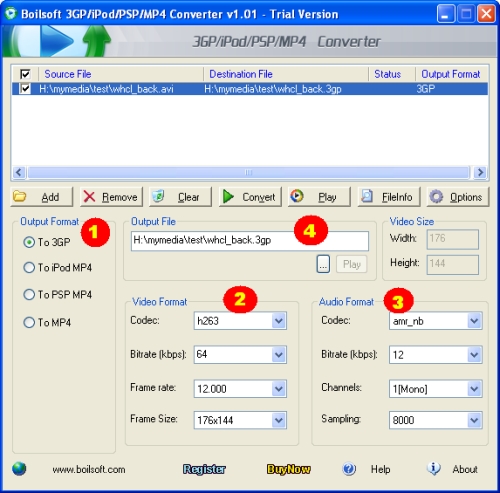
3. Click 'Convert' button, after converted, you will get a .3gp file can be used for your smart phone.
Tutorials
Topics


Copyright © 2023 Boilsoft Systems International Inc. All rights reserved.