Home
>
Boilsoft FLV Converter
> FLV to MP4
FLV Converter -- FLV to MP4 -- Flash to MP4
How to Convert FLV to MP4, Flash to MP4
How to Convert FLV to MP4 using Boilsoft FLV Converter? Using our FLV Converter to convert FLV to MPEG-4 video file (.mp4, .m4v) is very easy.
1. Launch Boilsoft FLV Converter, Add your FLV video file.
2. Select source FLV video file from file list, and select MP4 as output format.
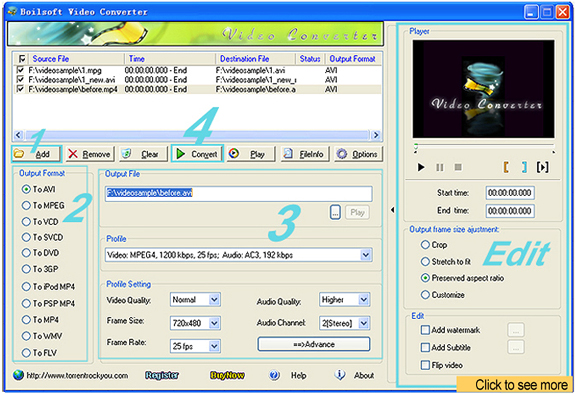
3. Set Output folder for MP4 output file. MP4 output settings are all can be customized.
4. Click convert button to convert FLV to MP4.
Tutorials
Topics


Copyright © 2023 Boilsoft Systems International Inc. All rights reserved.