DVD Creator-- add .idx+.sub subtitle file
How to add .idx+.sub subtitle file
Our DVD Creator is powerful enough to support popular subtitle formats such as .srt, .idx, .sub, .ssa, and etc. Let's view how to add .idx+.sub subtitle file.
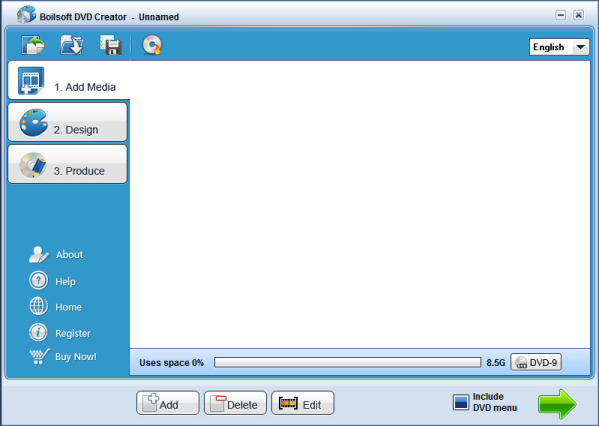
Step 1. Add file
All popular format video files can be added with button
 to Boilsoft DVD Creator.

This area shows how much space left.
Step 2 add subtitle
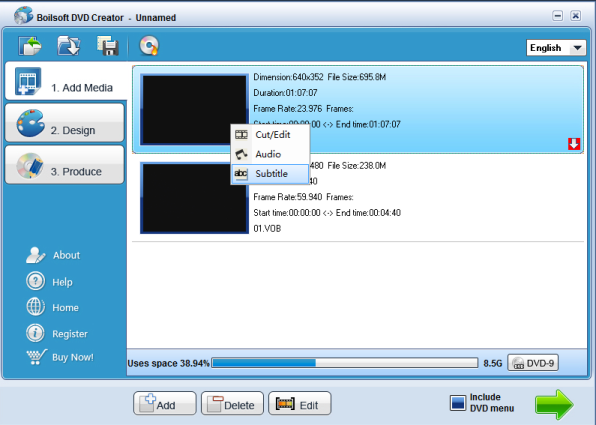
After adding the videos, you can also edit the video by clicking "Edit" - "Subtitle" or clicking mouse right on the added video as shown.The below panel will be displayed.

Press Add to add .idx + . sub subtitles to the video and the one can also be removed by pressing Remove.
You have option to activate or cancel it by clicking the checkbox.
The language of subtitles can be choosed as you like.
You can input several .idx.+ .sub subtitles, the output DVD can be a multi-subtitle one.
*Our sale pricing is intended for individual purchases, and only available for a limited time. Boilsoft Systems International Inc. reserves the right to limit order quantities.
Copyright © 2018 Boilsoft Systems International Inc. All rights reserved.
Protected by the copyright laws of the China and by international treaties.

